Evaluating the Realistic 3D Balloon Text Effect for Vector Design
In the realm of digital graphic design, typography often serves as the focal point of a composition. Designers frequently seek methods to elevate standard text into three-dimensional assets that convey depth, playfulness, or luxury without requiring hours of manual rendering. One specific solution gaining traction is the Realistic 3D Balloon Text Effect. This asset is not a font in the traditional sense but rather a collection of graphic styles designed for Adobe Illustrator. Understanding its capabilities, limitations, and ideal use cases is essential for designers deciding whether to integrate it into their workflow.
Understanding the Asset: Style vs. Font
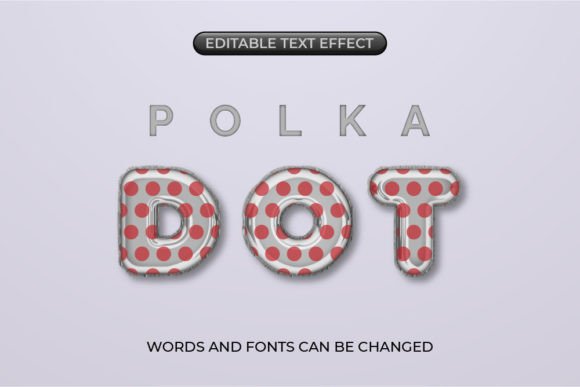
A critical distinction must be made before adopting this tool: the Realistic 3D Balloon Text Effect is not a typeface. It does not install into your operating system's font library. Instead, it functions as a set of Graphic Styles within Adobe Illustrator CC 2017 or later. This means the effect is an overlay of gradients, strokes, highlights, and shadows that can be applied to any vector object.
Because it relies on existing fonts installed on your desktop, the creative possibilities are virtually unlimited. You retain full control over the typography while the style handles the volumetric rendering. This separation of form (the letter shape) and surface (the balloon texture) offers a level of flexibility that static 3D font files cannot match. The result is a fully editable vector design where words and fonts can be changed simply by clicking and typing, maintaining the three-dimensional integrity of the effect.
Key Benefits and Workflow Efficiency
The primary advantage of using pre-made graphic styles for balloon text is efficiency. Creating a realistic balloon texture from scratch involves complex gradient meshes, careful highlight placement, and subtle shadowing to mimic light reflection on a latex or metallic surface. Achieving this manually for every project is time-consuming. By utilizing a dedicated style pack, designers can apply a professional-grade finish in seconds.
Furthermore, the fully editable nature of these vectors ensures that the design remains scalable and modifiable. Unlike rasterized 3D renders which pixelate when enlarged, vector-based balloon text retains crisp edges at any size. This makes the effect suitable for both digital screens and large-format printing. The ability to save these configurations into the Graphic Styles panel allows for rapid iteration; a designer can test five different typefaces in the time it would take to manually render one.
Versatility Beyond Typography
While the name suggests a focus on text, the utility of these graphic styles extends to other vector objects. Because the effect is applied via the Graphic Styles panel, it can be mapped onto shapes, icons, or custom illustrations. This allows for cohesive branding where both the logo mark and the logotype share the same inflated, tactile aesthetic. This versatility adds significant value to the asset, transforming it from a simple text trick into a broader design system component.
Technical Considerations and Requirements
To effectively utilize the Realistic 3D Balloon Text Effect, specific technical prerequisites must be met. The file format is native to Adobe Illustrator, specifically requiring version CC 2017 or above. Users working in alternative software such as Affinity Designer, CorelDRAW, or web-based tools like Canva will not be able to directly import or edit these graphic styles without converting the file to outlines, which subsequently removes the "easy-to-change" benefit.
Additionally, because the effect relies on complex gradients and transparency settings to achieve realism, file performance should be considered. Applying heavy graphic styles to extensive amounts of text or complex paths can increase file size and potentially slow down rendering times on older hardware. Designers working on projects with strict file size limits for web delivery may need to optimize the final output carefully.
Ideal Use Cases
This text effect is particularly well-suited for projects requiring a sense of fun, celebration, or modern pop aesthetics. Common applications include:
- Event Branding: Birthday parties, grand openings, and festivals where a festive atmosphere is required.
- Social Media Graphics: Eye-catching headers and posts that need to stand out in a crowded feed.
- Product Packaging: Specifically for confectionery, toys, or youth-oriented products where a tactile, squeezable look enhances appeal.
- Poster Design: Headlines that need to dominate the visual hierarchy with depth and color.
In these scenarios, the balloon effect communicates a specific mood instantly, reducing the need for additional decorative elements.
Limitations and When to Consider Alternatives
Despite its strengths, the Realistic 3D Balloon Text Effect is not a universal solution. There are situations where alternative approaches may yield better results. For instance, if a project requires photorealistic lighting interactions with a complex 3D environment (such as text casting shadows on uneven terrain), a dedicated 3D modeling software like Blender, Cinema 4D, or Adobe Dimension might be more appropriate. While Illustrator's 3D features have improved, they still lack the ray-tracing capabilities of true 3D suites.
Moreover, if the design brief calls for a minimalist, flat, or strictly corporate aesthetic, the playful and volumetric nature of balloon text may clash with the brand identity. In such cases, standard bold typography or subtle drop shadows would be more aligned with professional expectations. Additionally, because this is a style applied to existing fonts, the quality of the final output is heavily dependent on the base typeface chosen. A poorly constructed font with uneven stroke weights may not inflate convincingly, leading to distorted visuals.
Making the Decision
When evaluating whether to incorporate the Realistic 3D Balloon Text Effect into your toolkit, consider your primary software environment and the specific tone of your upcoming projects. If you operate primarily within the Adobe Illustrator ecosystem and frequently require vibrant, dimensional typography for marketing or event materials, this asset offers a high return on investment regarding time saved and quality achieved.
However, if your workflow is cross-platform or your design needs lean towards hyper-realism or minimalism, the utility of this specific style pack diminishes. It is best viewed as a specialized tool for vector artists who need to rapidly prototype and finalize inflated text concepts without sacrificing editability. By understanding that this is a style layer rather than a font, designers can leverage its full potential to create dynamic, engaging visuals that resonate with audiences seeking depth and texture.