Evaluating the Baby 3D PSD Editable Text Effect for Professional and Personal Design Projects
In the realm of digital design, particularly for niche markets like baby announcements, nursery decor, and childhood milestones, the demand for high-quality, three-dimensional typography is significant. Creating realistic 3D text from scratch in Adobe Photoshop requires a sophisticated understanding of lighting, texture mapping, extrusion settings, and rendering engines. For many designers, parents, and small business owners, this technical barrier can be prohibitive. This is where resources like the Baby 3D PSD Editable Text Effect come into play. These pre-configured files offer a shortcut to professional results, but understanding their specific utility, limitations, and how they compare to other design approaches is essential for making an informed decision.
Understanding the Core Functionality and Format
At its essence, a Baby 3D PSD Editable Text Effect is a specialized Photoshop document designed to automate the complex process of generating three-dimensional text with a soft, playful, or premium aesthetic suitable for infant-related themes. The "PSD" format indicates that the file is native to Adobe Photoshop, preserving all layers, masks, and smart objects necessary for editing. The defining feature of these templates is the use of Smart Objects. Unlike standard raster layers, a Smart Object acts as a container. When a user double-clicks the layer icon, a separate window opens where they can type their desired text. Upon saving that temporary file, the main document automatically updates, applying all the pre-set 3D extrusions, shadows, highlights, and textures to the new characters.
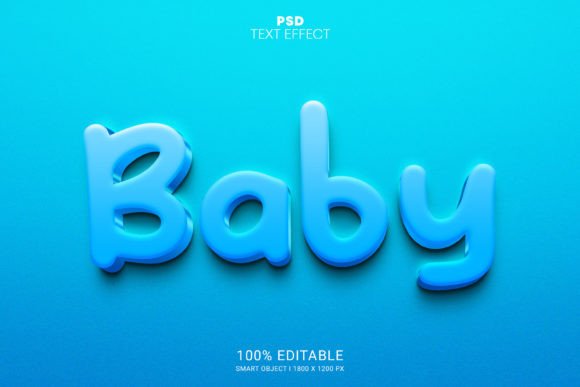
The specific iteration known as the Baby 3D PSD Editable Text Effect typically distinguishes itself through its visual language. While generic 3D text effects might lean towards metallic, glossy, or industrial looks, baby-themed variants prioritize softness. They often utilize pastel color palettes, rounded typefaces, and textures that mimic plush fabrics, soft clay, or matte plastics. The technical specifications usually include a resolution of 1800 x 1200 pixels, which provides sufficient density for high-quality printing on items like birth announcements, wall art, or social media graphics, while remaining manageable for web use. Furthermore, the organization of these files is critical; a well-organized structure with neatly arranged folders ensures that users can navigate the complexity of 3D layers without becoming overwhelmed.
Comparative Analysis: Templates vs. Custom Creation
When evaluating whether to utilize a Baby 3D PSD Editable Text Effect, it is helpful to compare this approach against the two primary alternatives: building the effect manually from scratch or using browser-based design tools.
Manual Creation in Photoshop: Building a 3D text effect manually offers unlimited creative freedom. A designer can adjust every light source, tweak the bevel width of each letter individually, and create custom displacement maps for unique textures. However, the tradeoff is time and skill. Achieving a photorealistic result that looks "soft" rather than "plastic" often takes hours of trial and error. For a user who needs a single announcement card, the return on investment for learning these advanced techniques is low. The Baby 3D PSD template eliminates the learning curve, offering a "no skill requirement" pathway to a result that might otherwise take a senior designer half a day to perfect.
Browser-Based Design Tools: Platforms like Canva or Figma have introduced 3D text features, but they often lack the depth and realism found in dedicated Photoshop PSDs. Browser-based 3D is frequently limited to basic extrusions with preset lighting that can look flat or artificial when printed at high resolutions. Additionally, these tools often rely on subscription models for premium assets. In contrast, a downloadable PSD file is a one-time asset that lives locally on your machine. The Baby 3D PSD Editable Text Effect leverages Photoshop's superior rendering engine, resulting in richer shadows and more nuanced surface details that browser tools struggle to replicate.
Assessing Strengths and Practical Limitations
The primary strength of the Baby 3D PSD Editable Text Effect lies in its efficiency and consistency. With features like 100 editable options (referring to the variety of styles or color variations included in a comprehensive pack), users can rapidly prototype different looks. The inclusion of both PSD and JPG files in the download zip adds versatility; the JPG serves as an immediate preview or a quick-use asset, while the PSD allows for deep customization. The "well-organized layers" aspect cannot be overstated. In complex 3D files, poor layer management can make editing impossible for non-experts. A template that groups lighting, background, and text elements logically empowers users to change background colors or adjust shadow intensity without breaking the image.
However, there are limitations to consider. The most significant constraint is software dependency. To utilize these effects, the end-user must have access to Adobe Photoshop. While the editing process itself requires no advanced skill, the barrier to entry is the software license. Furthermore, while Smart Objects are powerful, they are not infinitely flexible. If a user wishes to fundamentally alter the shape of the 3D extrusion or change the lighting angle from a side-light to a top-down spotlight, they may need to delve into the deeper 3D panel settings, which reintroduces the complexity the template was meant to avoid. Additionally, the fixed resolution of 1800 x 1200 pixels is excellent for standard prints and digital use, but it may require upscaling techniques for very large format printing, such as billboard-sized nursery murals, potentially leading to a loss in sharpness if not handled correctly.
Decision Factors: When to Choose This Resource
Determining whether the Baby 3D PSD Editable Text Effect is the right choice depends largely on the user's specific goals, timeline, and technical comfort level.
This resource is ideally suited for:
- Small Business Owners: Etsy sellers or local print shops specializing in baby products who need to produce high-volume, high-quality mockups or final designs quickly.
- Parents and Hobbyists: Individuals creating personalized nursery art or digital announcements who want a professional look without investing months in learning graphic design theory.
- Marketing Professionals: Social media managers needing eye-catching, dimensional typography for campaigns related to parenting brands, where speed and visual impact are prioritized over custom modeling.
Conversely, this tool may not be the best fit if the project requires a highly specific, non-standard 3D style that deviates significantly from the "baby" aesthetic (e.g., gritty, industrial, or hyper-realistic metal textures). In such cases, the predefined nature of the Smart Object might feel restrictive. Similarly, if the user does not own Photoshop and has no intention of purchasing it, free alternatives or vector-based 3D tools might be a more pragmatic starting point, even if the quality is slightly lower.
Maximizing Value Through Organization and Quality
The value of a design asset is often hidden in its file structure. A high-quality Baby 3D PSD Editable Text Effect distinguishes itself through meticulous organization. When layers are neatly arranged in folders, it facilitates a non-destructive workflow. Users can toggle visibility of specific elements, such as dust particles, soft glows, or background patterns, to customize the mood of the image. The ability to edit the text via Smart Objects ensures that the integrity of the 3D effect remains intact regardless of the word length or character count, although extremely long phrases may require manual kerning adjustments to maintain visual balance.
The inclusion of high-resolution outputs (1800 x 1200 PX) ensures that the final product holds up under scrutiny. In the context of baby photography and announcements, images are often viewed closely by family members or printed for keepsakes. Pixelation or blurry edges can detract from the sentimental value of the piece. Therefore, the "High Quality" designation of these PSDs is not merely a marketing term but a functional necessity for print-ready materials.
Final Thoughts on Selection
In conclusion, the Baby 3D PSD Editable Text Effect represents a strategic compromise between total creative control and operational efficiency. It democratizes access to high-end 3D typography, allowing users to bypass the steep learning curve of 3D modeling while still achieving results that rival custom work. By understanding the tradeoffs—specifically the reliance on Photoshop and the predefined stylistic constraints—users can effectively evaluate whether this tool aligns with their project requirements. For those seeking a balance of ease, quality, and professional aesthetics in the niche of baby-themed design, these editable smart object templates offer a robust and reliable solution.