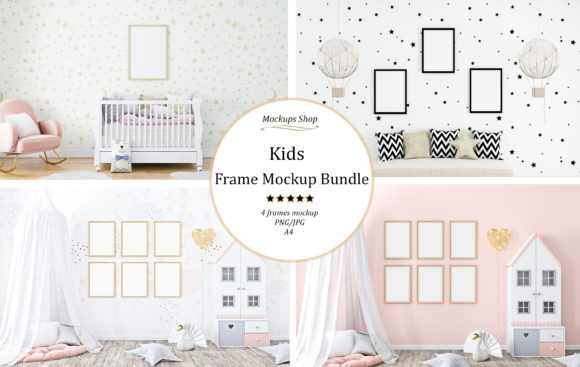
Bringing Your Kids' Art to Life with the Kids Frame Mockup Bundle
Every parent knows the feeling. You open a drawer or a closet, and there it is: another stack of colorful drawings, finger paintings, and school projects that your child poured their heart into. You want to display them, to celebrate their creativity, but sticking them on the fridge with magnets often feels temporary and cluttered. On the other hand, framing every single piece can get expensive and time-consuming, especially when you aren't sure which frame style or wall color will look best in your living room or nursery. This is where digital tools step in to bridge the gap between imagination and reality. The Kids Frame Mockup Bundle offers a practical solution for visualizing how children's artwork fits into a modern home before you commit to printing or framing.
It is important to clarify right away that this is a digital product. No physical frames, posters, or teddy bears will be shipped to your door. Instead, you are downloading a set of high-resolution image files designed to act as a canvas for your own designs. The bundle typically includes four high-resolution JPG files and four high-resolution PNG files, each sized at 3600 x 2400 pixels. These dimensions ensure that when you place your image inside the mockup, the result is crisp and clear, suitable for everything from web portfolios to large-scale prints. The frames within these scenes are versatile, accommodating standard sizes like A1, A2, A3, and A4, making them compatible with most common art prints and children's drawings.
Why Visual Context Matters for Parents and Designers
When you are trying to decide how to decorate a child's bedroom or a family living space, looking at a flat image of a frame on a white background rarely tells the whole story. Lighting, wall texture, and surrounding furniture all play a huge role in how a piece of art feels in a room. The Kids Frame Mockup Bundle solves this by providing realistic 3D renderings of frames placed in cozy, lived-in environments. You might see a white Scandinavian-style frame leaning against a soft blue wall next to a plush sofa, or a wooden frame hanging above a toy shelf in a sunlit nursery.
For parents, this allows for a "try before you buy" experience without the hassle. You can take a photo of your child's latest masterpiece, insert it into the mockup using basic editing software, and instantly see how it looks in a styled interior. Does the bright red crayon drawing clash with the beige tones of the mockup room? Would a black frame look too harsh against the pastel background? These are questions you can answer in minutes rather than days. It turns the decorating process from a guessing game into a confident design choice.
Real-World Applications for Different Users
The utility of this bundle extends far beyond just proud parents wanting to spruce up their home office or hallway. Various professionals and hobbyists find unique ways to leverage these assets in their daily workflows.
- Small Business Owners and Etsy Sellers: If you sell printable wall art for kids' rooms, presenting your product effectively is crucial. Customers are more likely to purchase a digital download if they can visualize it in a real home setting. By placing your "ABC" poster or cute animal illustration into one of these mockups, you create an emotional connection with the buyer, showing them exactly how your product enhances a space.
- Interior Designers and Decorators: When pitching a room makeover to clients with children, showing a mood board with actual framed art examples helps sell the vision. Using these mockups, designers can quickly swap out different art styles to match the client's taste, whether they prefer modern minimalism or a more eclectic, colorful vibe.
- Educators and School Administrators: Schools often need to showcase student work for open houses, websites, or fundraising auctions. Instead of taking uneven photos of artwork pinned to a bulletin board, teachers can digitize the students' work and place it into these professional-looking frames. It elevates the perceived value of the students' efforts and presents the school as a place that values aesthetics and quality.
- Bloggers and Content Creators: Parenting bloggers or lifestyle influencers frequently need high-quality images to accompany posts about organizing kids' art or reviewing home decor products. These mockups provide ready-made, aesthetically pleasing backgrounds that make blog posts look polished and professional without requiring a photoshoot.
Understanding the Technical Details
To get the most out of the Kids Frame Mockup Bundle, it helps to understand what you are working with. The inclusion of both JPG and PNG formats offers flexibility. JPGs are universally compatible and great for quick edits, while PNGs often support transparency, allowing you to layer the frame over your own background images if the pre-set scenes don't quite match your needs. The resolution of 3600 x 2400 pixels is significant; it means the images are large enough to be used for high-quality marketing materials or even printed as part of a catalog without losing detail.
The scenes themselves are curated to reflect current interior design trends. You will notice elements like soft lighting, cozy textiles, teddy bears, and clean lines that evoke a sense of warmth and childhood innocence. The color palettes often feature whites, blues, and neutral tones, which serve as an excellent backdrop for colorful children's art. Because the frames are blank, they act as a neutral template, ready to accept any image you choose to insert.
Things to Consider Before Downloading
While these tools are incredibly useful, there are a few practical considerations to keep in mind to ensure they meet your expectations. First, remember that you need basic image editing software to use these files. Programs like Adobe Photoshop, GIMP, or even some advanced online editors are required to replace the blank area of the frame with your own image. If you are not familiar with layers and smart objects, you may need to watch a quick tutorial to get started.
Secondly, consider the aspect ratio of your artwork. The mockups are designed to fit standard paper sizes like A4 or A3. If your child's drawing is an odd shape or a panoramic size, you might need to crop your image or add a mat border within the editing software to make it fit perfectly inside the frame boundaries. Forcing an image to fit without adjusting it can lead to distortion, which ruins the realistic effect.
Finally, think about your end goal. Are you using this for a digital portfolio, a social media post, or a physical print? If you plan to print the final result (for example, a flyer showing what the framed art will look like), ensure your inserted image is also high resolution. Putting a low-quality phone photo into a high-resolution mockup will result in a final image where the frame looks sharp but the art looks blurry.
Making the Most of Your Digital Assets
The beauty of the Kids Frame Mockup Bundle lies in its reusability. Unlike a physical frame that holds one picture at a time, these digital templates can be used infinite times. You can test fifty different variations of a nursery wall in an afternoon. You can create a seasonal rotation of art for your website, swapping out spring themes for winter holidays effortlessly. For entrepreneurs, this means you can create a vast library of marketing images without ever leaving your desk.
In a world where visual presentation drives engagement, having the right tools to showcase creativity is essential. Whether you are a mom trying to organize a chaotic playroom, a designer selling the next big trend in kids' decor, or a teacher celebrating student achievements, this bundle provides the stage your art deserves. It transforms simple digital files into powerful visualization tools, helping you make better design decisions and present your work in the best possible light. Just remember, since this is a digital download, the creative heavy lifting happens on your screen, but the impact can be felt throughout your physical space.