Mastering the Silver 3D Text Effect Template
In the fast-paced world of digital design, the difference between a project that gets scrolled past and one that captures attention often lies in the details. Texture, lighting, and depth are not just decorative elements; they are communication tools that establish tone and hierarchy immediately. This is where a high-quality Template of Silver 3d Text Effect becomes an indispensable asset for creators who need to produce professional results without spending days rendering complex scenes from scratch.
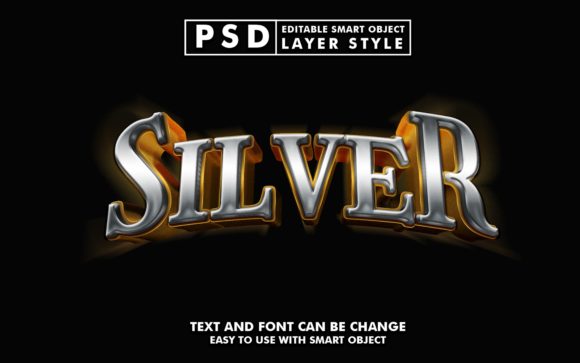
This graphic resource offers a streamlined workflow for applying a sophisticated metallic style to your typography. At its core, the template leverages the power of Photoshop's Smart Objects to automate the heavy lifting of lighting calculations, reflection mapping, and shadow casting. Instead of manually adjusting bevels, embossing, and gradient overlays, you simply double-click the smart object layer named "Your Text," replace the placeholder with your own copy, save the file, and watch the transformation happen instantly on the main canvas. It is a practical solution that bridges the gap between amateur experimentation and polished, studio-grade output.
Why Metallic Typography Matters in Modern Design
Silver and chrome aesthetics have cycled through design trends for decades, yet they remain perpetually relevant because of what they symbolize: innovation, luxury, strength, and futurism. When you apply a Template of Silver 3d Text Effect to a project, you are tapping into a visual language that suggests premium quality. Unlike flat design, which prioritizes minimalism, 3D metallic text adds tangible weight and presence to a composition. It interacts with light, creating highlights and shadows that make the text feel like a physical object occupying space.
For marketers and brand strategists, this tactile quality can significantly increase click-through rates and engagement. A banner ad featuring flat black text might convey information, but the same text rendered in gleaming silver with realistic reflections conveys value. The psychological impact is subtle but powerful; viewers associate the effort and complexity of the effect with the quality of the product or service being advertised.
Versatile Applications Across Industries
The true value of this resource lies in its adaptability. Because the file is well-organized with editable layers and comes at a high resolution of 2100x1310 pixels at 300 DPI, it is ready for both screen and print media. Here is how different professionals can leverage this tool:
- Digital Marketers and Social Media Managers: Create eye-catching Facebook covers, YouTube channel art, and Twitter headers that stand out in crowded feeds. A silver title on a promotional banner can signal a "premium sale" or a "limited edition" launch more effectively than standard typography.
- Event Planners and Promoters: Design flyers and posters for nightlife events, galas, or tech conferences. The metallic sheen pairs exceptionally well with dark backgrounds, making it ideal for evening events or luxury brand activations.
- Content Creators and YouTubers: Use the effect for video thumbnails and intro titles. A cartoon title or movie-style header rendered in silver can give a gaming channel or film review series a cinematic feel that elevates the production value.
- Fashion and Apparel Designers: Mock up T-shirt designs and clothing graphics before sending them to print. The ability to visualize how the silver ink will look on fabric helps in making better decisions about placement and scale.
- Corporate Presenters: Enhance logo presentations and pitch decks. When introducing a new brand identity or a flagship product, a 3D silver logo animation or static render commands respect and attention.
Maximizing Efficiency with Smart Object Technology
One of the most frustrating aspects of 3D design is the time commitment required to tweak settings until the lighting looks right. This template eliminates that friction. The inclusion of 100% editable smart objects means you retain full control over the content while the style remains consistent. Whether you are creating a greeting card for a wedding or a placard for a retail store window, the consistency of the effect ensures that your branding remains cohesive across all materials.
The technical specifications of the file further support professional use. With dimensions of 2100x1310 pixels and a density of 300 DPI, the output is crisp enough for large-format printing. This is crucial for designers who need to pivot quickly from a digital social media post to a physical flyer without losing image quality. The well-organized layer structure also means that if you need to adjust the background color or add additional glow effects, you can do so without disrupting the core text effect.
Creative Strategies for Unique Results
While the template provides a ready-made style, creativity comes from how you contextualize it. Do not simply drop the text onto a white background and call it done. To get the most out of the Template of Silver 3d Text Effect, consider the environment you place it in.
Contrast is Key: Silver reflects its surroundings. To make the text pop, place it against deep blues, rich purples, or stark blacks. Avoid light gray backgrounds where the silver might get lost. The interplay between the bright highlights of the metal and the darkness of the background creates the drama that draws the eye.
Combine with Other Elements: Use the text as part of a larger illustration. For example, in a movie title design, integrate the silver letters with smoke, sparks, or geometric shards. The template includes three image files alongside the PSD, giving you immediate assets to build a scene around your typography.
Experiment with Angles: Although the template has a set perspective, you can duplicate the smart object, transform it, and layer it to create reflections on virtual floors or water surfaces. This adds an extra layer of realism that can make a simple banner look like a high-end advertisement.
Practical Tips for Consistent Branding
For freelancers and small business owners managing multiple clients, consistency is vital. When using this effect for a series of posts or a campaign, ensure that the font choice aligns with the brand's voice. A heavy, blocky font will look industrial and strong in silver, while a thin, elegant serif will appear luxurious and refined. The template handles the rendering, but you must curate the typography.
Furthermore, keep your file organization pristine. Since the template relies on specific smart object names to function correctly, always duplicate the main file before starting a new variation. This prevents accidental overwrites and allows you to maintain a library of different text variations for future use. If you are creating a sequence of images for an Instagram carousel, generate all the text variants first, save them, and then compile them into your final layout.
Ultimately, resources like this are about empowering you to focus on the creative concept rather than the technical execution. By offloading the complex rendering work to a pre-built Template of Silver 3d Text Effect, you free up mental energy to solve bigger design problems: How do we communicate the message? Who is the audience? What action do we want them to take? The tool handles the shine; you handle the story.
Whether you are designing a website element, a clothing line, or a simple greeting card, the ability to quickly deploy high-quality 3D text gives you a competitive edge. It allows you to iterate faster, test more ideas, and deliver visuals that resonate with audiences looking for something substantial and visually striking. Embrace the efficiency, experiment with the settings, and let the metallic finish add that necessary touch of professionalism to your next project.