Mastering 3D Realistic Stone Text Effect for Pro Designs
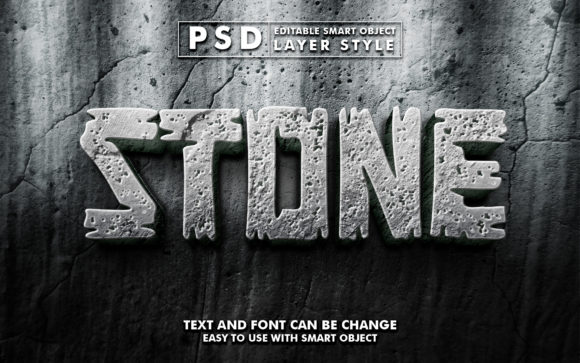
In the crowded digital landscape, capturing attention within seconds is the difference between a scroll-past and a conversion. Visual hierarchy dictates how users consume information, and nothing establishes weight, permanence, and authority quite like typography that mimics natural materials. The 3d Realistic Stone Text Effect offers designers and content creators a sophisticated method to elevate standard text into a tactile, three-dimensional asset. Unlike flat design trends that prioritize minimalism, stone textures introduce depth, shadow, and a sense of physical presence that can ground a composition and make it feel substantial.
For professionals ranging from marketing directors to freelance graphic artists, the challenge often lies not in the vision but in the execution. Creating photorealistic stone textures from scratch requires advanced knowledge of lighting, displacement maps, and complex layer blending in Photoshop. It is a time-consuming process that can stall project timelines. This is where specialized graphic resources become invaluable. By utilizing a pre-built 3d Realistic Stone Text Effect template, you bypass the technical hurdles of texture generation and focus entirely on creative application. These resources typically leverage Smart Objects, a powerful feature in Adobe Photoshop that allows for non-destructive editing.
Streamlining Workflow with Smart Object Technology
The core value of this specific graphic resource lies in its intelligent file structure. When you access the file, you are presented with a high-resolution canvas, typically sized at 2000x1250 pixels with a print-ready 300 DPI. This resolution ensures that whether the final output is a digital banner or a large-format poster, the clarity remains sharp. The magic happens within the layers panel. Instead of manually painting cracks, moss, or granite grains onto your letters, the file utilizes a "Smart Object" workflow.
To edit the file, the process is remarkably straightforward. You simply locate the smart object layer named "Your Text," double-click it, and a new window opens. Here, you replace the placeholder text with your own copy. Once you save this sub-file, the main document automatically updates, wrapping your new text in the complex stone rendering. This automation saves hours of manual labor. For a small business owner creating a seasonal promotion or a YouTuber designing a thumbnail, this efficiency means turning around high-quality assets in minutes rather than days. The well-organized layers ensure that even users with intermediate Photoshop skills can navigate the file without confusion.
Elevating Brand Perception Through Texture
Why choose stone over metal, glass, or plastic effects? The psychology of material design suggests that stone conveys stability, history, and resilience. When applied to a logo presentation or a movie title, a 3d Realistic Stone Text Effect subconsciously signals to the viewer that the brand or story is established and enduring. This is particularly effective for industries such as architecture, law, heritage tourism, or fantasy entertainment.
Consider a real estate developer launching a new housing complex. A flyer featuring their project name in a sleek, modern sans-serif font is effective, but rendering that same name in textured limestone or rugged granite adds a layer of perceived quality and permanence. It suggests that the buildings are not just structures, but landmarks. Similarly, for a fantasy novel cover or a gaming clan logo, the roughness of the stone texture can evoke ancient ruins or epic battles, instantly setting the mood before the audience reads a single word of the synopsis.
Versatile Applications Across Media Channels
The utility of this effect extends far beyond static print materials. In the realm of social media, where visual noise is constant, distinct textures help posts stand out. A Facebook cover photo or a Twitter header utilizing stone typography can create a cohesive and professional brand identity that separates a business page from a personal profile. For video content creators, these static images serve as excellent lower-thirds or intro cards. While the effect itself is static, the high-quality render (often accompanied by additional image files in the package) can be easily animated in video editing software to create dynamic title sequences.
Furthermore, the application in merchandise design is significant. T-shirt designs and clothing graphics benefit greatly from textures that mimic physical materials. A stone-textured graphic on a dark heather grey tee creates a subtle, tonal look that appeals to consumers looking for understated style rather than loud, neon prints. Greeting cards and placards also gain a touch of elegance; a wedding invitation with names rendered in smooth marble or a birthday card with a fun, rocky cartoon title demonstrates attention to detail that recipients appreciate.
Technical Specifications and Creative Flexibility
When evaluating a graphic resource, technical specs are paramount. A high-quality 3d Realistic Stone Text Effect package usually includes one primary PSD file and several supplementary image files, totaling over 100 editable elements. This depth allows for customization beyond just the text. Users can often adjust the lighting direction, the intensity of the shadows, or the color balance of the stone to match their specific brand palette. The 300 DPI resolution is critical for those intending to use the designs for physical products like flyers, posters, or large banners. Low-resolution web graphics often pixelate when printed, ruining the illusion of realism; starting with a 300 DPI source file prevents this issue entirely.
However, it is important to recognize fit considerations. While stone effects are powerful, they are not a universal solution. For tech startups aiming for a futuristic, clean aesthetic, or for medical communications requiring absolute clarity and sterility, a heavy stone texture might feel too archaic or cluttered. In these scenarios, the stone effect might serve better as an accent rather than the primary typographic style. Additionally, because the effect relies on complex shading and texture, legibility can sometimes suffer if the background is too busy. It is best practice to pair these heavy text effects with clean, solid backgrounds or blurred imagery to ensure the message remains readable.
Maximizing Value for Diverse Creators
Who benefits most from this tool? Freelancers managing multiple client accounts will find the time-saving aspect crucial. Being able to generate ten different variations of a stone title for a client presentation in under an hour allows for more iterative creativity. Educators creating engaging classroom materials can use these effects to make history lessons or literature guides visually stimulating. Even hobbyists working on personal projects, such as custom illustrations or family event invitations, gain access to professional-grade tools that were previously out of reach without years of training.
The inclusion of multiple image files alongside the main PSD provides further flexibility. These extra assets can be used as overlays, background textures, or elements for composite images, expanding the creative possibilities beyond just text. Whether you are designing a YouTube cover to announce a new series or crafting a banner promotion for a holiday sale, having a library of high-quality, editable effects streamlines the entire production pipeline.
Ultimately, the goal of any design tool is to bridge the gap between imagination and realization. The 3d Realistic Stone Text Effect does exactly this by removing technical barriers and providing a robust foundation for creativity. By leveraging smart objects and high-resolution textures, creators can produce work that looks expensive and thoughtful, regardless of their budget or timeline. As visual communication continues to evolve, the ability to quickly adapt and apply high-fidelity textures remains a competitive advantage for anyone looking to make a lasting impression.